FinanceTgApp
README.md
FinanceTgApp
A Telegram Mini App for joint financial tracking for two people. SQLite is the source of truth, Google Sheets is a two-way mirror. The entire app consists of two containers and uses ~200 MB of memory.
Architecture rationale and analysis of alternatives: docs/00-research-and-stack.md. How to manage a joint budget, where the “who owes whom” information comes from, and why a joint account is needed: docs/finance.md.
What it looks like
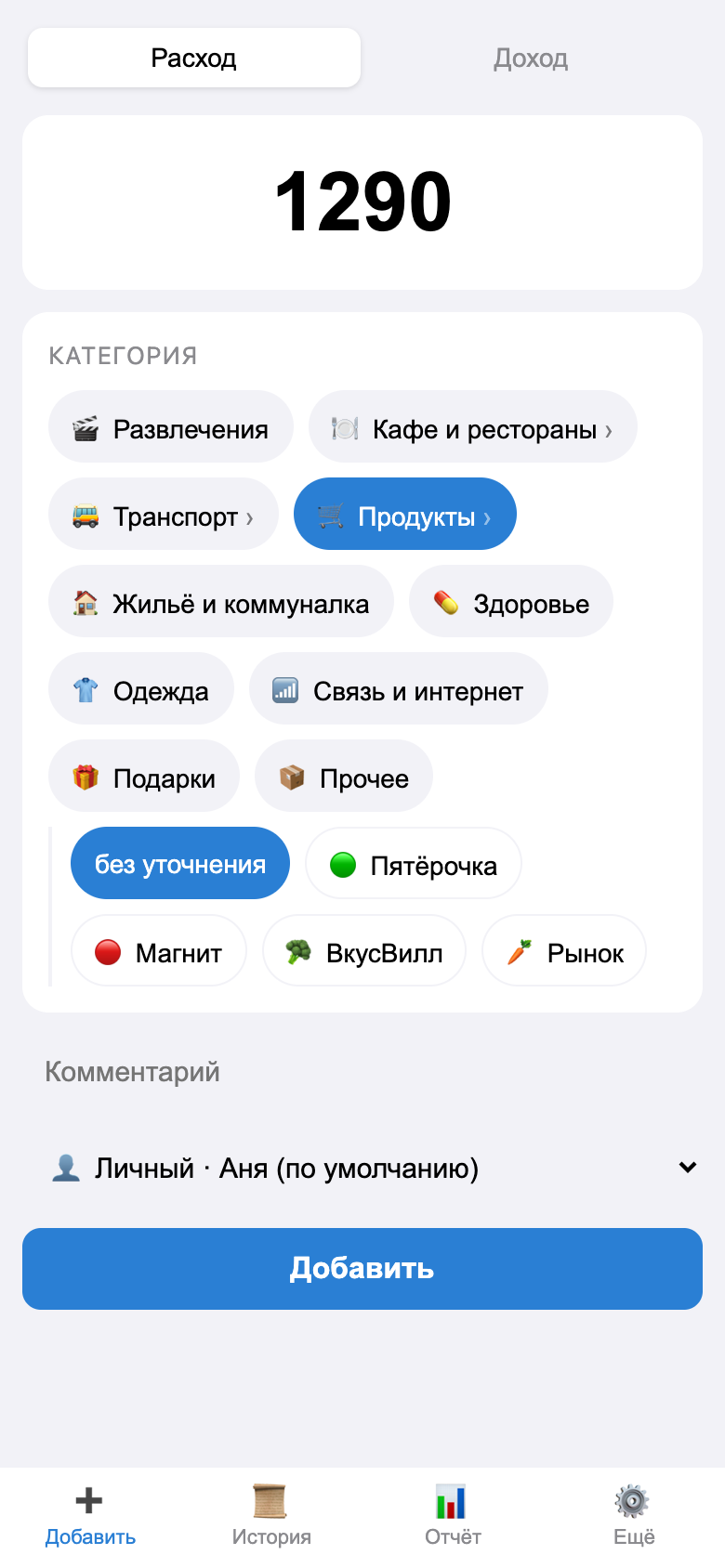
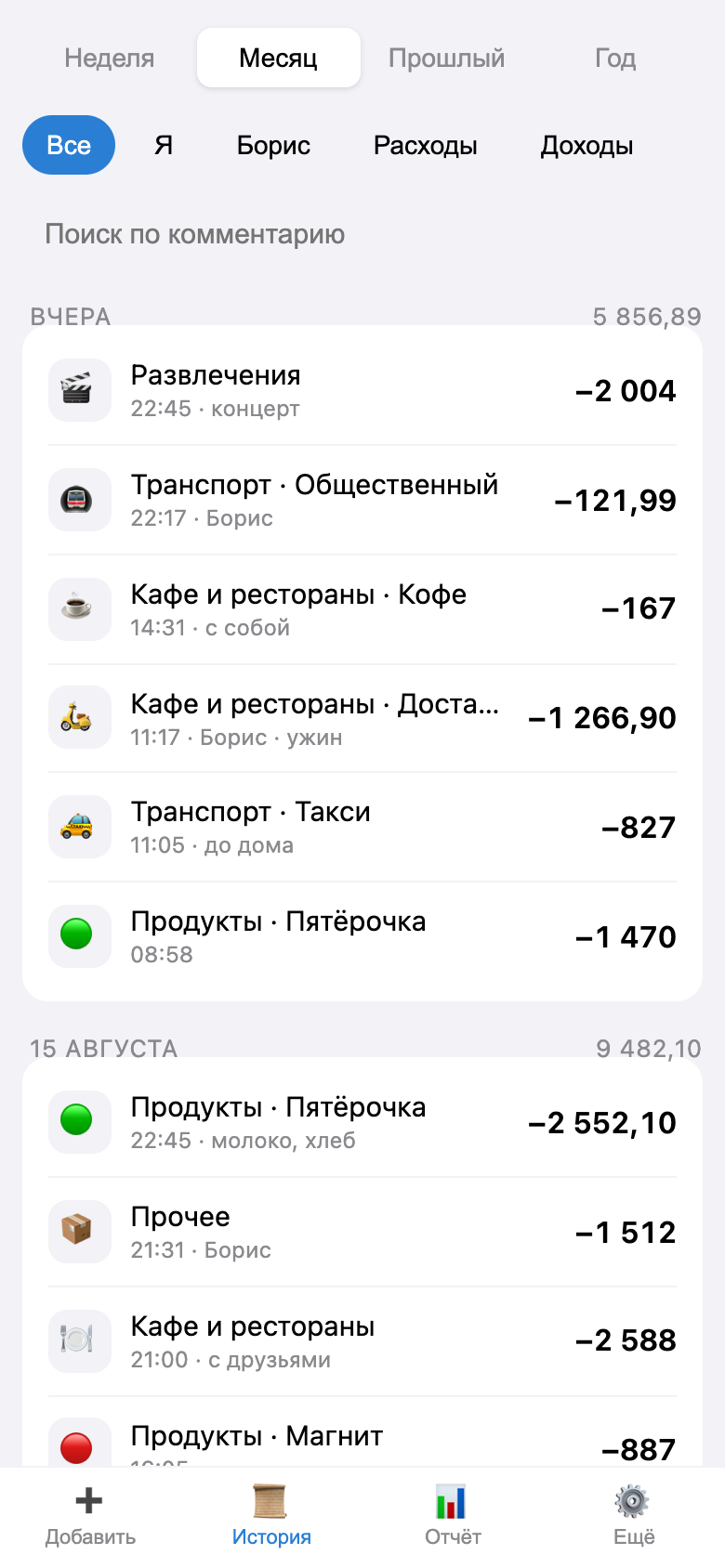
| Add an expense | History | Report |
|---|---|---|
 |
 |
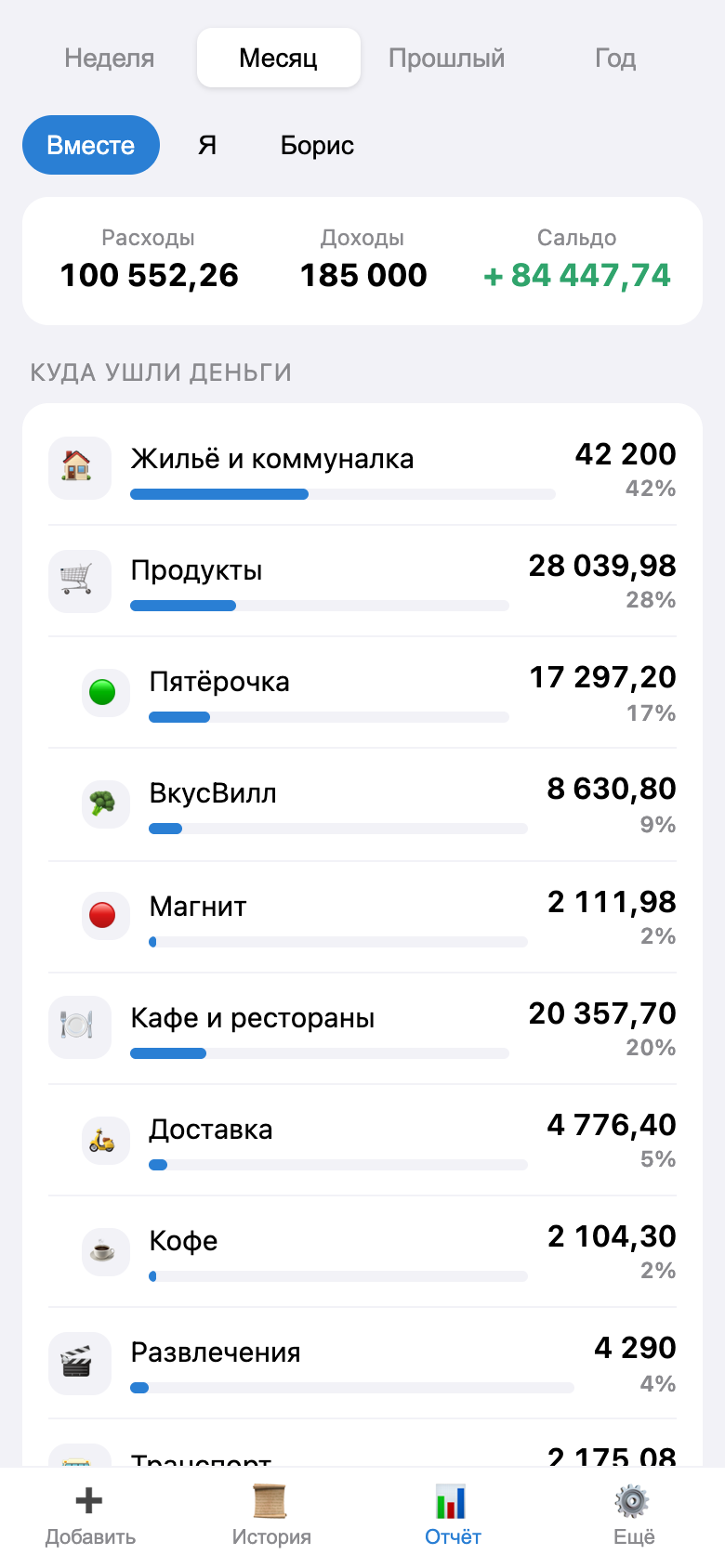 |
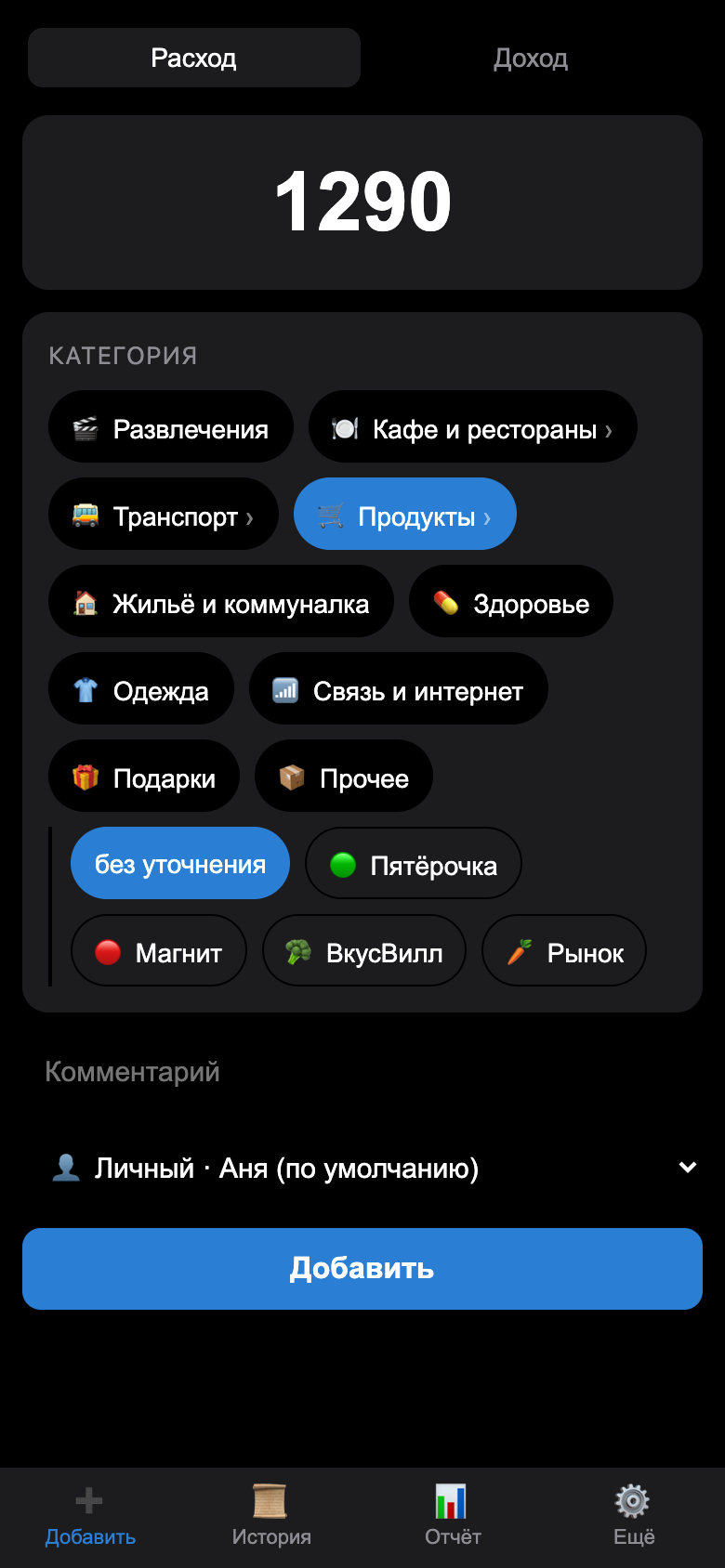
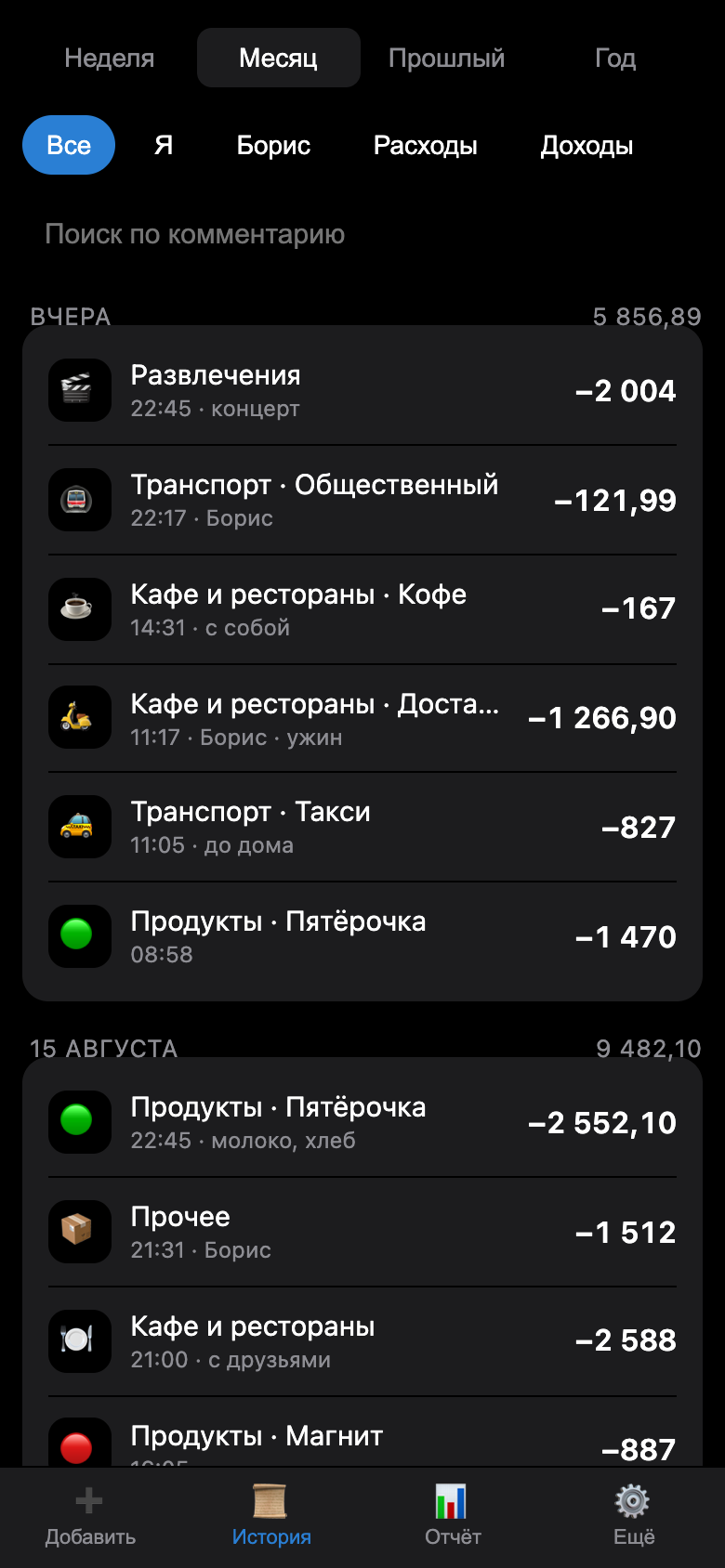
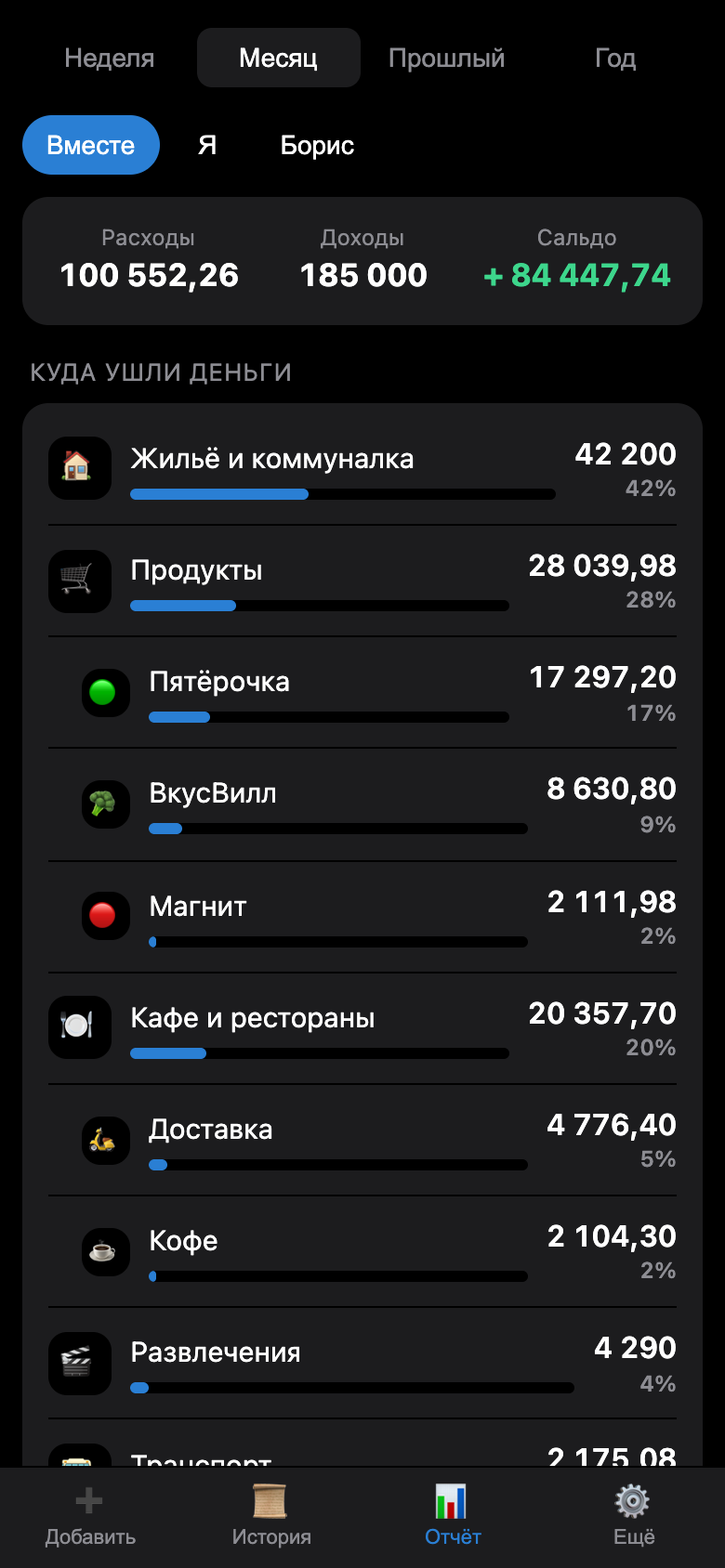
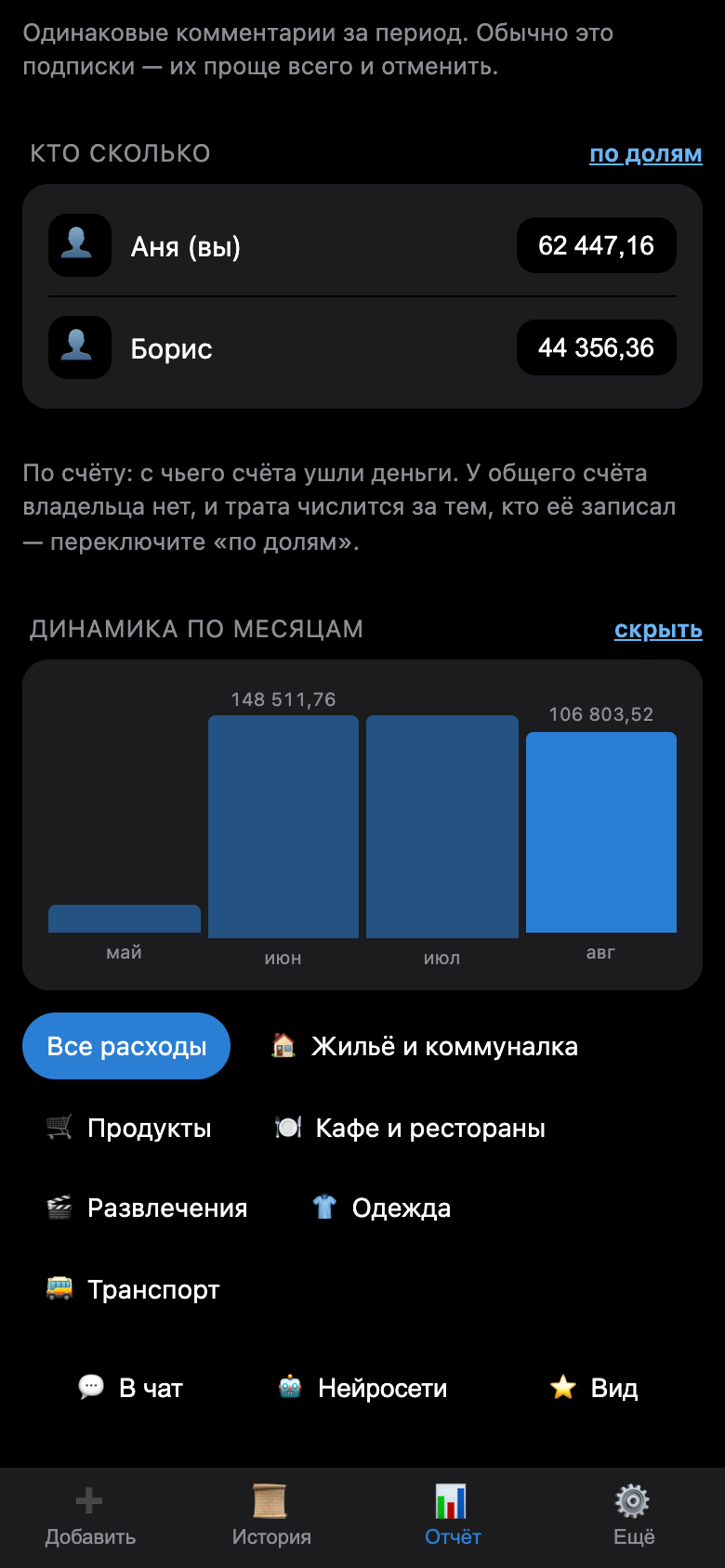
| Select a category with two taps: first the category, then the subcategory | Grouped by day, daily total, who entered it | The parent category displays the total along with its subcategories |
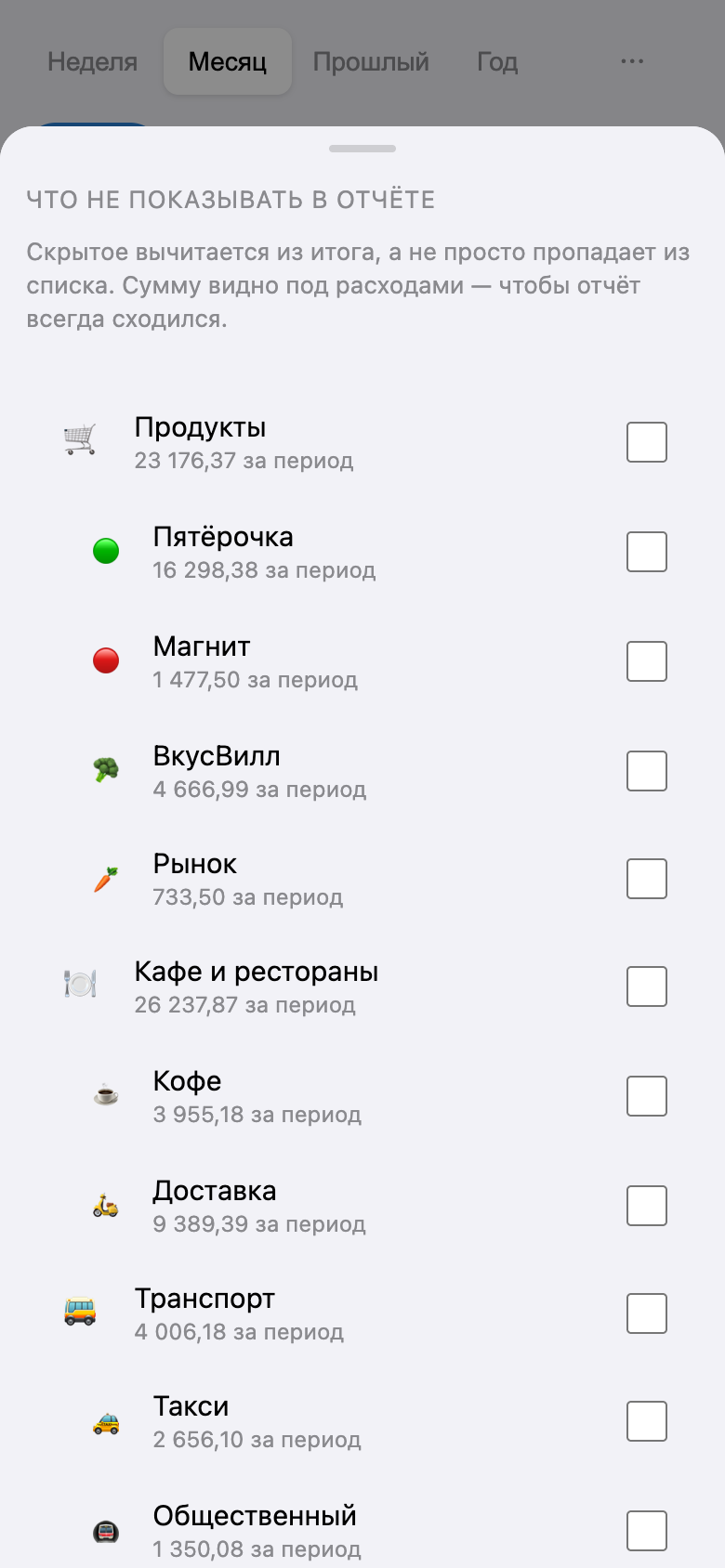
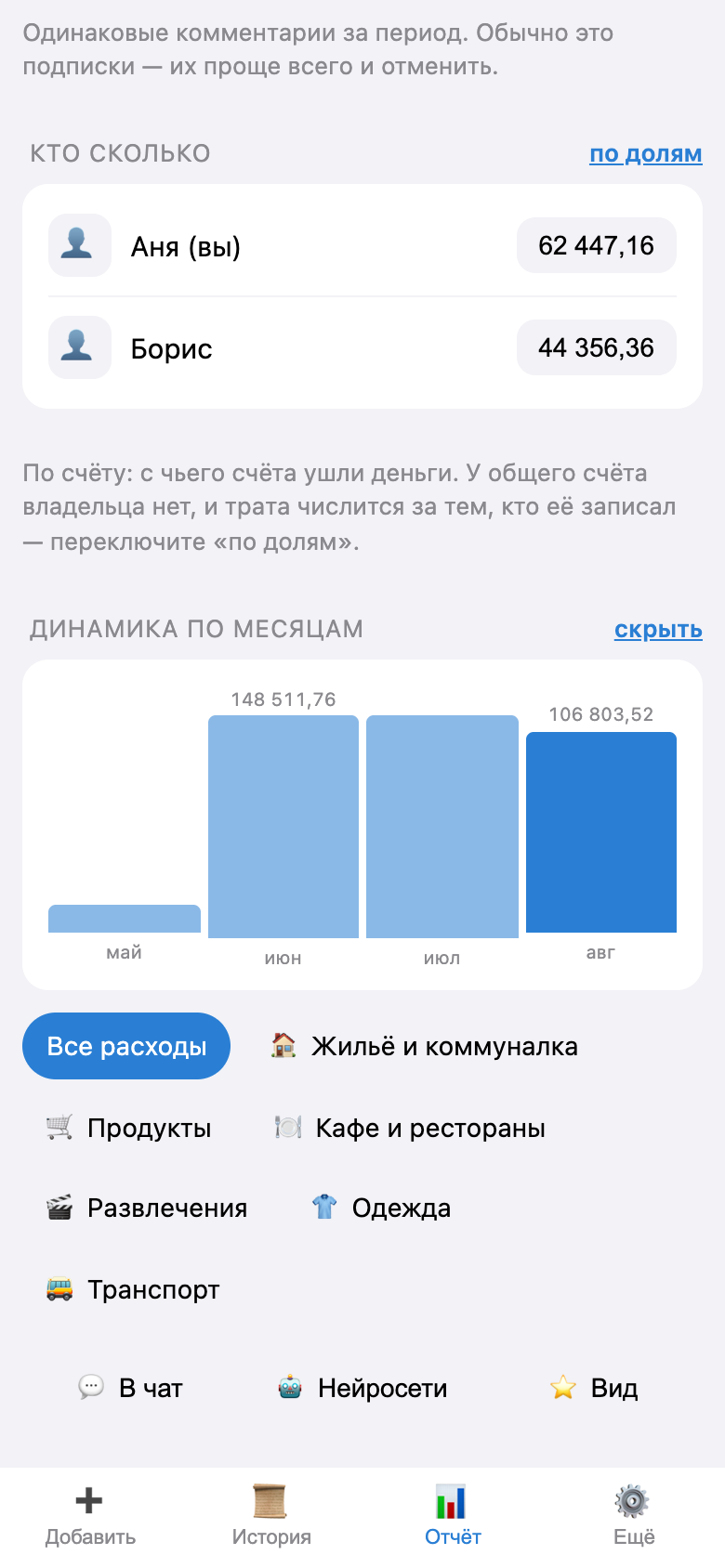
| What Not to Show | Monthly trends | Edit entry |
|---|---|---|
 |
 |
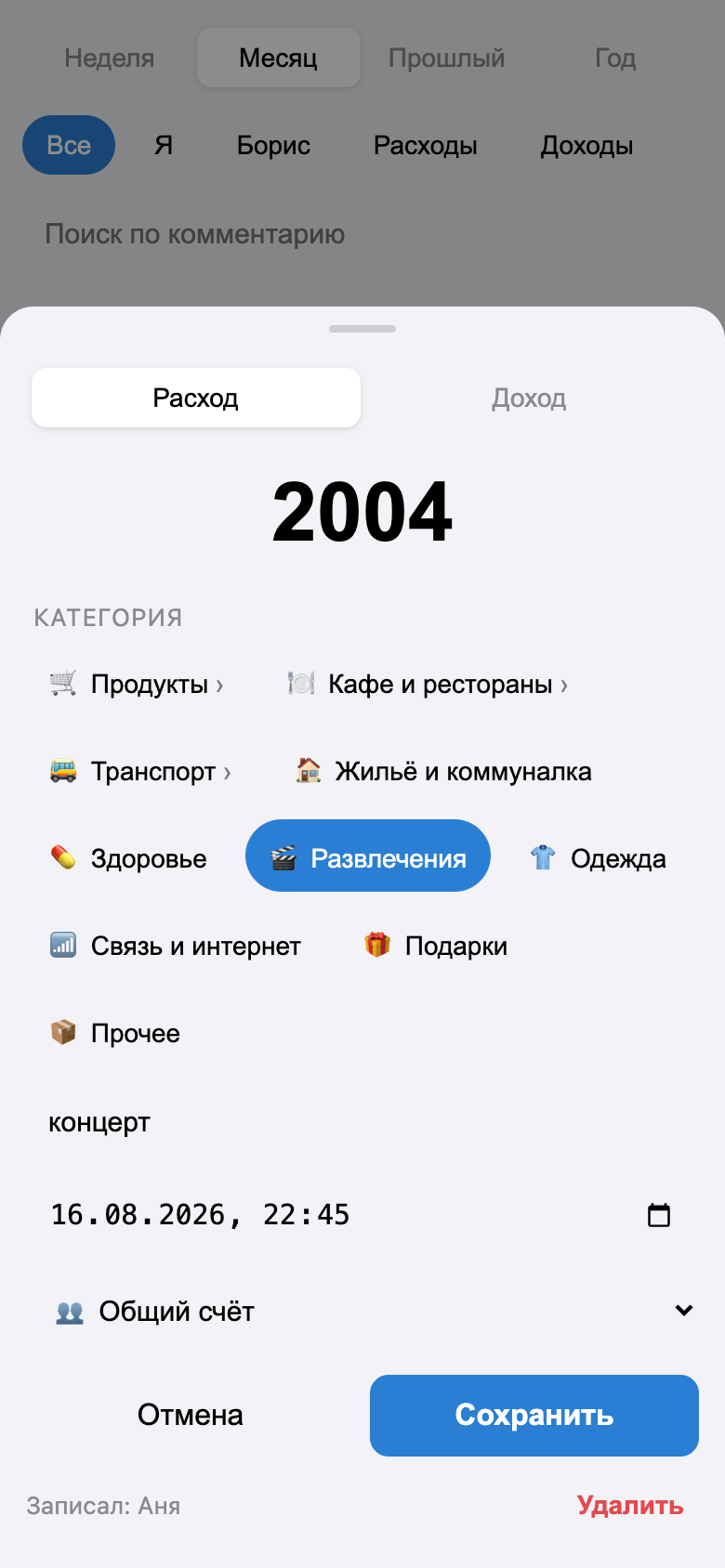 |
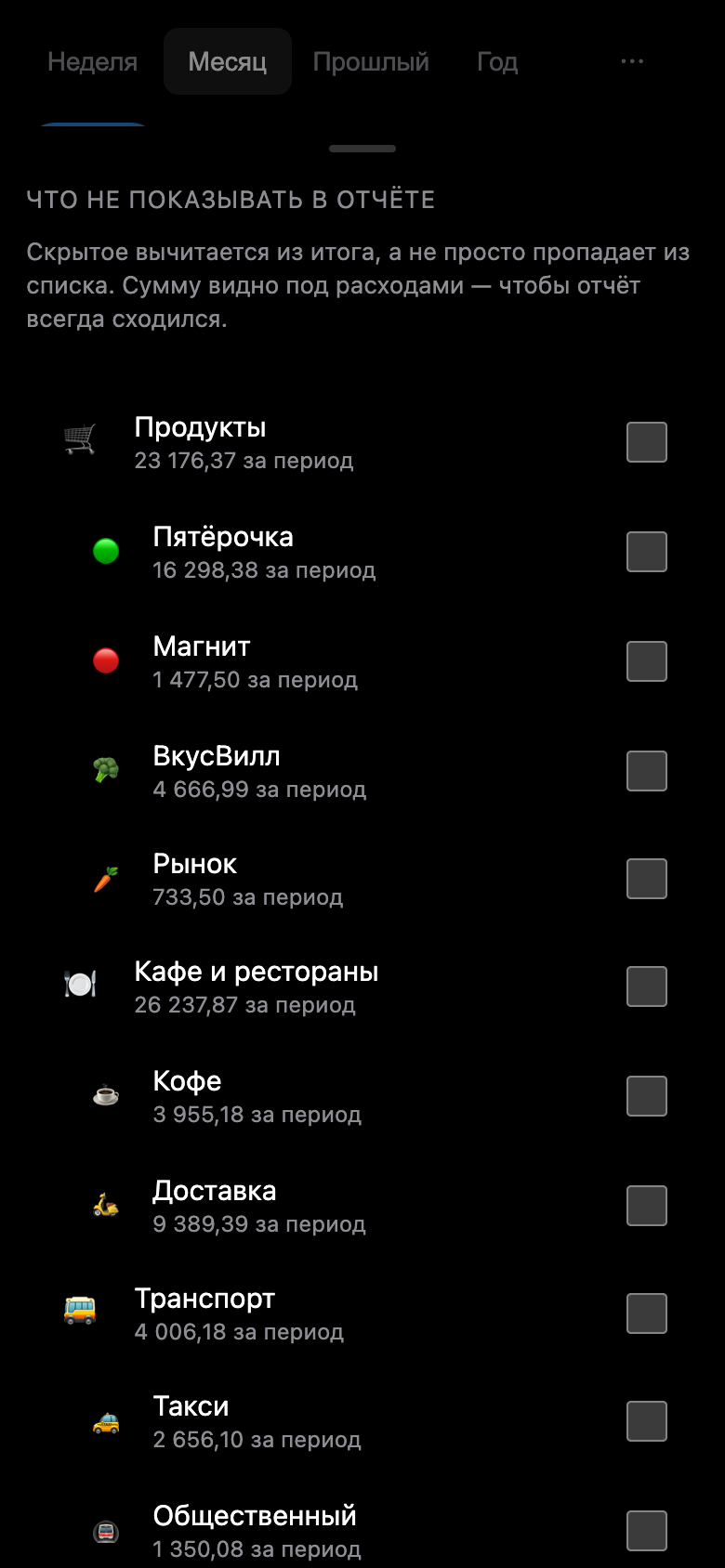
| Hidden items are deducted from the total, and the amount is visible | Custom SVG, with no graphical dependencies | Any field of an already recorded transaction |
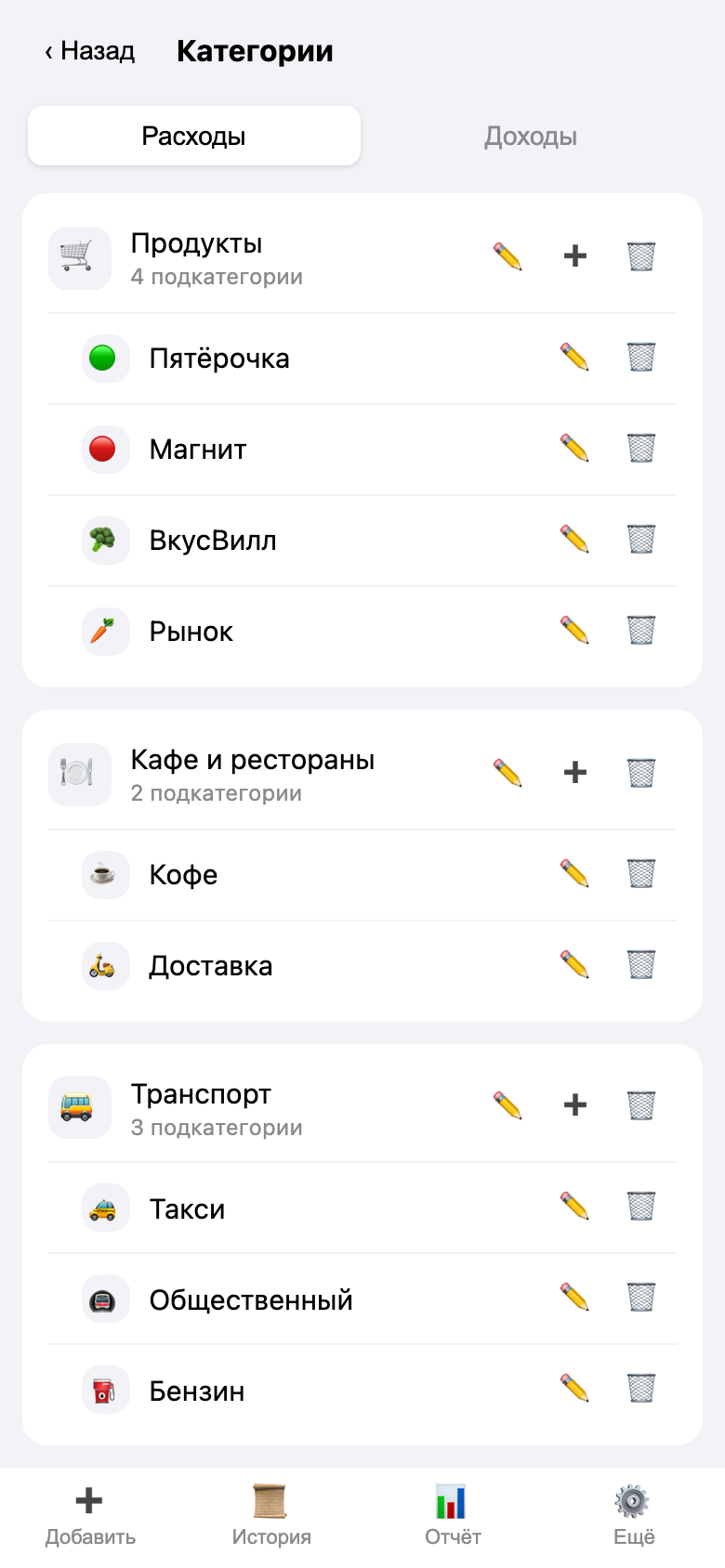
| Category directory | Reminders and Calculations |
|---|---|
 |
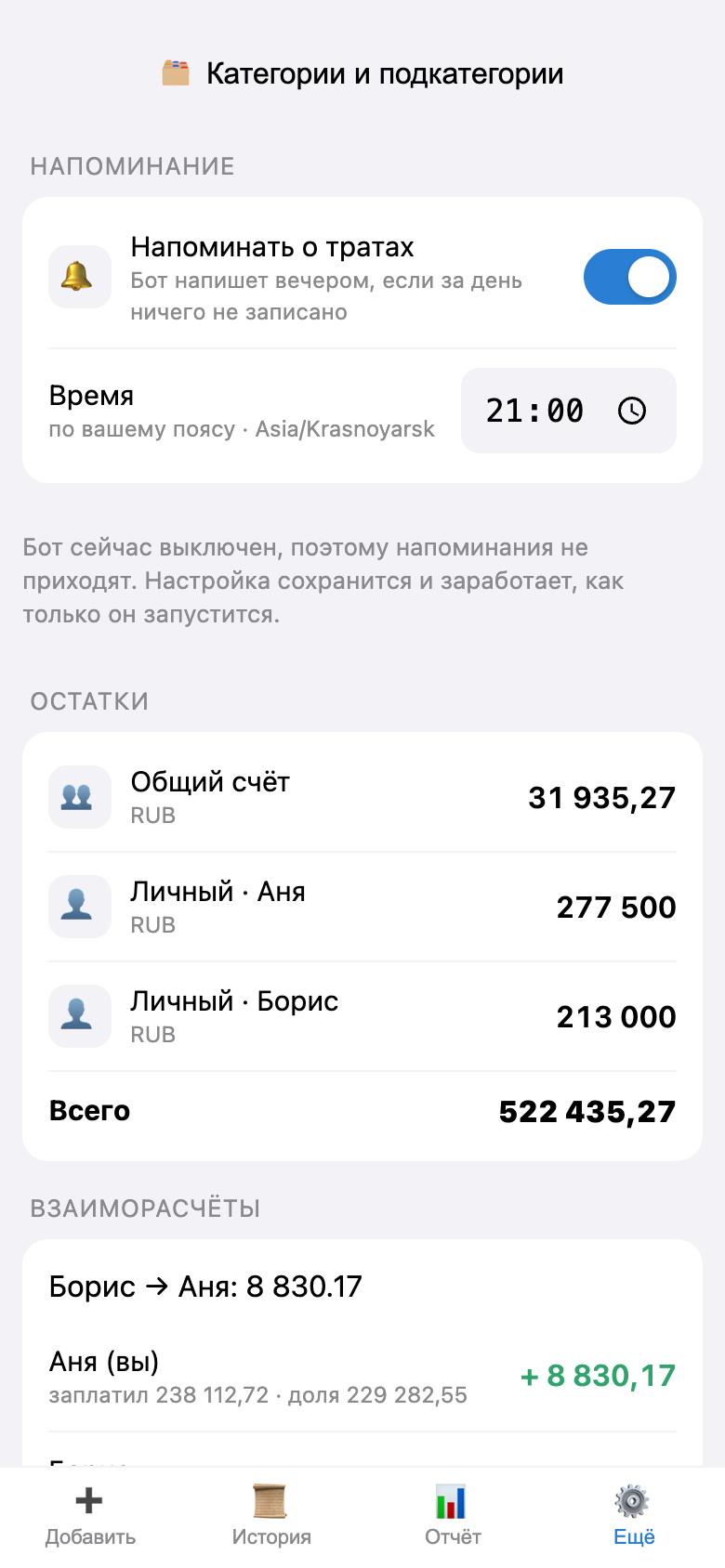 |
| Create, rename, change the icon, set a limit | Custom reminder time, who owes whom |
Dark theme
 |
 |
 |
 |
 |
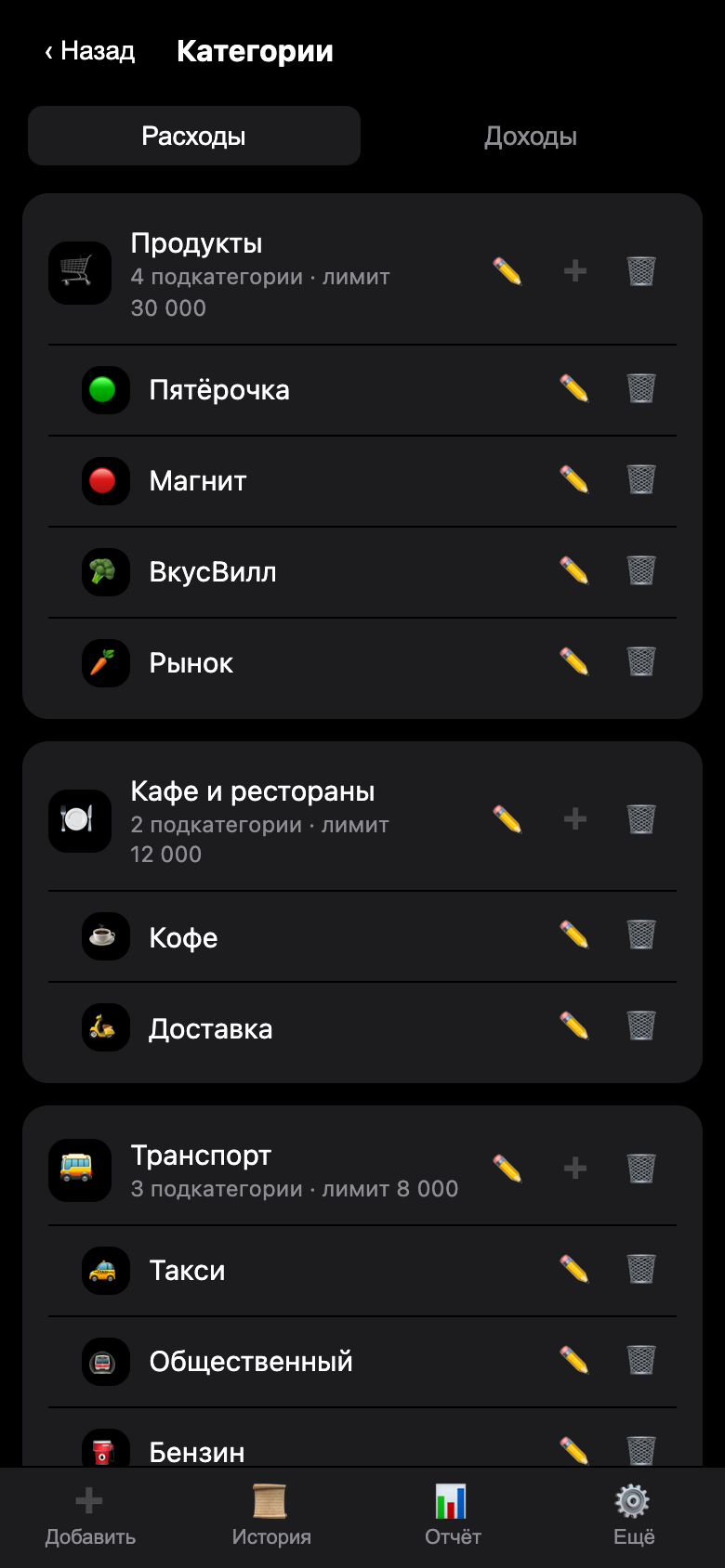 |
The color palette is taken from Telegram: the app adopts the client’s theme; there are no separate settings.
One-command demo
View it without any configuration—no bot, no tokens, and no Telegram:
make setup   # один раз: зависимости бэкенда и фронта
make demo
http://localhost:8000 will open with a pre-populated journal: two participants, three months of expenses, about 275 transactions, salaries, transfers to a shared fund, and the accumulated debt one owes the other. The data is fixed—the demo looks the same for everyone.
If you don’t want to set up Python and Node:
make demo-docker
The demo runs on a separate database data/demo.db and doesn’t affect the production database. It’s accessible
without Telegram (DEV_AUTH_BYPASS), so it can’t be exposed externally—only locally.
What’s already working
- Mini App: adding expenses and income in three taps, a history view grouped by day, reports by category and participant, account balances, and mutual settlements.
- The entry screen fits entirely on the screen: the amount, date, category, and button are visible without scrolling. Categories are collapsed into three rows and sorted by most recent use—the top row covers almost the entire daily entry area, while the rest is revealed by the “More” chip. Comments and tags are hidden under a drop-down bar but appear as captions when filled in.
- The day of the expense is displayed directly in the form: “Other · Yesterday · Today” below the total. An evening receipt, recorded in the morning, is assigned to yesterday’s entry and doesn’t mess up today’s report. Time isn’t requested: no one remembers the exact hours and minutes, and they don’t affect the report anyway.
- Categories and subcategories: “Groceries → Pyaterochka, Magnit.” A two-level tree, with each branch having its own icon and name; these can be edited directly in the app.
- Editing history: You can open and edit any entry—the amount, date, type, category, account, comment, and tags.
- Filters: The transaction history and report can be filtered by person, account, transaction type, category, and tag; the selected category automatically includes its subcategories. The “by person” filter answers the question “whose expense was it?” rather than “who recorded it?” Filter settings are shared across both screens, so the figures in the report always match the list in the history.
- Report: Custom time period and month-by-month navigation, exclusion of categories and tags from the total, comparison with the previous period, category limits, largest expenses, recurring payments, income breakdown, monthly chart, and saved views. For details, see “How to Read the Report.”
- Bot: quick single-line entry (
500 пятёрочка),/month,/balance,/settle,/llm,/sync“Change Category” and “Delete” buttons below each entry. - Reminders: In the evening, the bot sends a message to anyone who hasn’t recorded anything that day. Each user sets their own time in the app; it’s calculated based on their time zone.
- Accounts: By default, expenses are charged to the author’s personal account. A shared account is set up separately and splits expenses equally—the app calculates who owes whom and accounts for transfers and repayments. A breakdown of the model is available in docs/finance.md.
- Google Sheets: export via the outbox and import of manual edits made in the spreadsheet.
- Export for LLM:
/api/export/llm— compact aggregates instead of raw logs.
Stack
| Layer | Technologies |
|---|---|
| Backend | Python 3.12, FastAPI, aiogram 3, SQLAlchemy 2 + Alembic, APScheduler |
| Database | SQLite (WAL). Migration to Postgres — change DATABASE_URL |
| Frontend | React 18 + TypeScript + Vite, TanStack Query, ~69 KB gzip |
| Infrastructure | Docker Compose: application + Caddy (auto-TLS) |
The bot and API run in the same process: one codebase, one container, shared database transaction.
Quick Start (locally)
cp .env.example .env   # заполните BOT_TOKEN и ALLOWED_TELEGRAM_IDS
make setup
make migrate
make api                # бэкенд + бот в режиме polling
make web                # в другом терминале: фронт на localhost:5173
The Mini App cannot be opened http://localhost within Telegram—you need an HTTPS address.
For local debugging, set up a tunnel and specify it in BotFather:
cloudflared tunnel --url http://localhost:5173
To open the interface in a regular browser without Telegram, set DEV_AUTH_BYPASS=true
and DEV_TELEGRAM_ID=<ваш id>. In production, this flag must be disabled.
Deployment on a VPS
You’ll need Docker with the Compose plugin. On a clean Ubuntu installation:
curl -fsSL https://get.docker.com | sh
Next:
git clone https://github.com/NORMss/FinanceTgApp.git && cd FinanceTgApp
cp .env.example .env && nano .env      # BOT_TOKEN, ALLOWED_TELEGRAM_IDS, PUBLIC_URL, DOMAIN, BOT_MODE=webhook, секреты

# Каталог данных: БД и ключ Google. Владелец — uid 10001, под которым работает контейнер
mkdir -p data && sudo chown -R 10001:10001 data

docker compose --profile build run --rm frontend   # сборка Mini App в frontend/dist
docker compose up -d --build                       # приложение + Caddy
docker compose logs -f app
The same thing with a single command— make upif the server has make.
Ports 80 and 443 must be open: without them, Caddy won’t pass the ACME verification and won’t receive a certificate. Migrations are triggered when the container starts, and the webhook registers itself.
The final step is in @BotFather: /newapp (or Bot Settings → Menu Button) and specify
PUBLIC_URL the Mini App address.
Update:
git pull
docker compose --profile build run --rm frontend
docker compose up -d --build
PUBLIC_URL and DOMAIN specify the same hostname in two formats: the first is needed by the app
(webhook, Mini App button), and the second is needed by Caddy to issue a certificate. .env It must be located
in the root of the repository next to docker-compose.yml: that’s where Compose retrieves it from ${DOMAIN}.
Minimum requirements: 1 vCPU, 1 GB RAM, 10 GB disk space. If the frontend build runs out of memory
on 1 GB, build it locally (make build) and copy it frontend/dist
to the server—the container frontend isn’t needed in that case.
If there’s already a website running on ports 80/443 on the server
, then there’s no need to install Caddy from the package—it won’t be able to use those ports. The application can
serve both the API and the Mini App’s static files on its own, so an external proxy only needs one
proxy_pass:
make up-proxy
or you can set it manually:
docker compose --profile build run --rm frontend
docker compose -f docker-compose.yml -f docker-compose.behind-proxy.yml up -d --build app
The service name app must be included at the end. Without it, Compose will start all services, including
Caddy, and you’ll end up with Bind for 0.0.0.0:80 failed: port is already allocated.
For the same reason, you cannot run make up.
The app listens on 127.0.0.1:8000 (the port is set by the variable APP_PORT), and it’s
not accessible from the outside—only through your proxy. Next, add a virtual host.
nginx:
server {
    listen 443 ssl;
    server_name finance.example.com;

    # сертификат выпускается вашим обычным способом: certbot --nginx -d finance.example.com
    ssl_certificate     /etc/letsencrypt/live/finance.example.com/fullchain.pem;
    ssl_certificate_key /etc/letsencrypt/live/finance.example.com/privkey.pem;

    location / {
        proxy_pass http://127.0.0.1:8000;
        proxy_set_header Host              $host;
        proxy_set_header X-Real-IP         $remote_addr;
        proxy_set_header X-Forwarded-For   $proxy_add_x_forwarded_for;
        proxy_set_header X-Forwarded-Proto $scheme;
    }
}
If the external web server is Caddy, the entire configuration boils down to three lines:
finance.example.com {
	reverse_proxy 127.0.0.1:8000
}
There’s no need to separate paths between the API and static files: /api/* and /tg/* FastAPI handles it,
everything else is served as Mini App files from frontend/dist.
If the external proxy runs in a container itself
Then 127.0.0.1 this won’t work: for the container, the proxy is its own loopback, not the host.
Instead of port forwarding, we connect the application to the proxy network and access it via its DNS name.
Find another project’s network and configure it in .env:
docker network ls
PROXY_NETWORK=имя_сети_прокси
Startup (ports are not published externally at all):
docker compose -f docker-compose.yml -f docker-compose.shared-net.yml up -d --build app
On the proxy network, the application is accessible under the name finance-app. The site block for Caddy—it
will issue the certificate itself, just as it does for its other domains:
finance.example.com {
	reverse_proxy finance-app:8000
}
After editing the proxy configuration, you need to restart it:
docker compose exec caddy caddy reload --config /etc/caddy/Caddyfile
Backup
The entire configuration is located in the directory data/. Simply copy the entire directory:
docker compose stop app && tar czf backup-$(date +%F).tar.gz data && docker compose start app
A duplicate copy of the log is stored in Google Sheets if synchronization is enabled.
If an “Error 502” appears in the app
, the 502 is not returned by the app itself but by the proxy in front of it, and it means exactly one thing: the app couldn’t be reached. That’s why it appears immediately on all screens and resolves on its own as soon as the app comes back online. You should look not in the Mini App, but in the container:
docker compose ps app
The STATUS column shows both uptime and the number of restarts. If the container is newer than the session—it restarted, and the 502 occurred at that exact moment.
docker inspect --format '{{.State.OOMKilled}} {{.RestartCount}}' $(docker compose ps -q app)
true — The container ran out of memory. Restart APP_MEMORY_LIMIT to .env (default
512 MB) and recreate the container: docker compose up -d app. The actual amount needed
will be shown docker stats — the app usually takes up 260–280 MB.
docker compose logs app | grep -E "startup|Telegram не отвечает"
The message “Telegram is not responding” is normal: the app is running, and bot registration
is repeating in the background, and the API isn’t causing a delay. Previously, when the api.telegram.org would interrupt
the entire launch process; the container would get stuck in an endless reboot loop, and during that time, the Mini App wouldn’t
open at all.
A single “Error 502” on the screen is tolerable in itself and can be resolved by retrying: the Mini App retries failed reads on its own (1, 2, 4, 8 seconds), and the included Caddy waits up to 20 seconds for the app to return. The message only reaches the user if the restart takes longer than that.
Configuring Google Sheets
- In Google Cloud, create a project and enable the Google Sheets API.
- Create a service account, download the JSON key, and place it in
data/google-credentials.json. - Create a spreadsheet and grant the service account (its email address from the JSON file) Editor permissions.
- In
.env:SHEETS_ENABLED=trueandGOOGLE_SPREADSHEET_ID=<id из адреса таблицы>. - Restart the app. The
transactionsand header will be created automatically.
File permissions are granted within the spreadsheet itself, not in the Google Cloud Console: IAM roles do not affect Sheets documents. You can check the entire chain—settings, key, access—with a single command, which specifies the exact reason for failure:
make check-sheets
How it works:
- Each change operation is queued
sync_outboxin the same transaction as the data itself; - a background worker unloads the accumulated data in a single batch once per minute—with 60 requests per minute per user, the quota doesn’t even come close to the limit;
- Google downtime doesn’t break the app: records remain in the queue and will be processed later;
- Manual edits made in the spreadsheet are recognized by the column
sync_hashand are imported back; - You can add a row directly in the spreadsheet—leave
idit blank, and the app will create a transaction and assign an ID.
Dates in the spreadsheet are stored as text (2026-08-11 14:30), and amounts as numbers. This is done intentionally:
when saving in USER_ENTERED Google would reformat the dates according to the locale, and the import would treat
every row as modified.
Structure
backend/app/
  api/          HTTP-слой: роуты, схемы, зависимости, разбор периода и фильтров
  bot/          aiogram: хендлеры, клавиатуры, middleware, исходящие уведомления
  models/       SQLAlchemy-модели
  repositories/ доступ к данным (без бизнес-логики)
  services/     бизнес-логика: журнал, отчёты, напоминания, быстрый ввод, экспорт
  sync/         Google Sheets: клиент, маппинг, воркер
  security/     проверка initData, сессионные токены
  scheduler.py  фоновые задания: выгрузка в Sheets и напоминания
  healthcheck.py проба живости для docker healthcheck
frontend/src/
  pages/        экраны Mini App
  components/   выбор категории, шторка правки, исключения, график, общие блоки
  api.ts        клиент к бэкенду
  categories.ts сборка дерева категорий из плоского списка
  period.ts     период отчёта: пресет, месяц или произвольный диапазон
  sticky.ts     настройки, переживающие закрытие приложения
  telegram.ts   обёртка над Telegram WebApp
scripts/        съёмка скриншотов и сквозные проверки интерфейса
docs/           ресерч по стеку, гид по общему бюджету, чтение отчёта, скриншоты
Screenshots are updated as follows—you’ll need Chrome installed:
make demo                                       # в одном терминале
cd scripts && npm install && npm run screenshots
End-to-end interface tests are also located there— make test-uisee the Tests section.
Categories
A two-level tree: root (“Products”) and subcategories (“Pyaterochka,” “Magnit,” “KB”). A third level is intentionally disabled—there’s no place to display it on the phone screen, and in the report it collapses anyway.
- Management—the More tab → Categories: create, rename, change icon, add a subcategory, hide, delete.
- Icon—an emoji or a pair of letters. Compound emojis (
👨👩👧) do not break up. - In the report, the parent category shows the total along with its subcategories, and below that is the breakdown.
- The “Groceries” filter also finds expenses at “Pyaterochka.”
- Deletion requires replacement. The app first shows how many transactions are linked to the category and its subcategories, and asks you to choose where to move them—to an existing category or a new one created on the spot. Without a replacement, only categories with no transactions are deleted. Transactions cannot remain uncategorized: last month’s report would no longer balance, and there would be no way to restore the breakdown.
- Hiding is not the same as deleting. A hidden category disappears from the selection lists, but the history remains as it was. Deletion rewrites the history: transactions are moved to the replacement category. When the past matters—hide it. Hidden categories are grouped at the bottom of the screen and can be restored with a single button.
- Along with the category, its subcategories are deleted, and the quick-input rules
(
пятёроч → …) move to the replacement category so that chat input doesn’t get sluggish. - In Google Sheets, the path is written in full:
Продукты · Пятёрочка. You can also do the opposite— manually enter such a row into the spreadsheet, and the app will create the subcategory on its own.
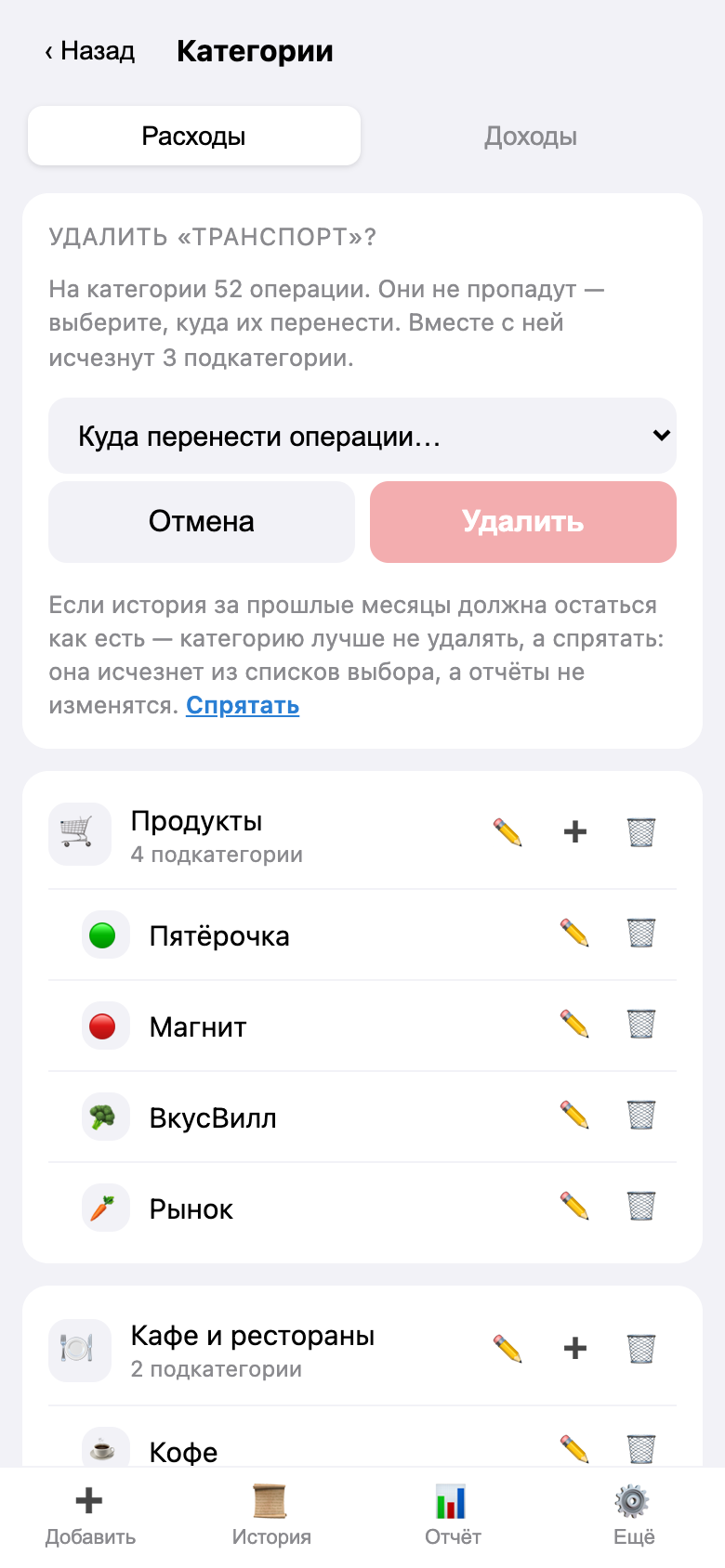
Before deleting, the app shows the consequences: how many operations are linked to the category, how many subcategories will be deleted along with it, and where everything will be moved.
Accounts and Settlements
- By default, a new entry goes to the author’s personal account—both in the app and in the bot.
- To record a transaction for someone else, select their personal account from the list. The expense will be attributed to them—in their history and in their report column—even though you were the one who entered it. This does not create a debt—it simply splits the shared account.
- There is no shared account on a fresh installation. It is created by tapping the button in More → Shared Accounts, provided a shared wallet actually exists. There is exactly one shared account.
- Expenses from the shared account are split equally among the participants and become a debt:
итог = заплатил − своя доля + погашения. The debt is paid off via a transfer from personal → personal. - Income is never split—it changes the balance but not the debt.
- Changing the account associated with a transaction in the history recalculates the shares: if you transferred an expense from the shared account to a personal account, the debt associated with it disappears.
If the debt amount is unclear, ask to see how it was calculated:
make check-settle
The system prints every transaction involved in the calculation, along with the account and shares.
Lines marked ПРОБЛЕМА — these are shares that cannot exist under the current rules; they
remain from those who managed the account in the version prior to August 17, 2026, when shares were recalculated
when the amount or type changed, but not when the account changed. Recalculate them all at once: make fix-settle.
For details, including a numerical example and an analysis of two general budget models, see docs/finance.md.
Reminders
Accounting falls apart not because of a lack of features, but because of a single forgotten evening. That’s why the bot sends a message in the evening to anyone who hasn’t recorded anything that day.
- Time — More → Reminder; each participant has their own, with a toggle switch there as well.
- It’s calculated based on the person’s time zone, not the server’s: the Mini App sends the browser’s time zone
(
Europe/Moscow) every time you log in, so after moving or flying to a new location, the reminder will arrive at 9 p.m. in your new time zone. Until your first login, the system usesDEFAULT_TIMEZONE. - If you recorded it yourself, no reminder will be sent. Transactions dated for that day are checked: yesterday’s receipt, added today, does not count toward today’s total.
- No more than once per local day. If the server restarts during this time, the reminder will be sent the following minute and won’t be lost.
- If the bot is blocked, there will be no repeats: this is evident from the Telegram response.
- Turn it off for everyone at once without changing the settings:
REMINDERS_ENABLED=false.
Security
The app is private: only two people use it, but the address will sooner or later end up in someone else’s logs. Hence the rule—nothing leaves the system except the fact of a failure.
initDataVerified via HMAC-SHA256 with the bot’s token,auth_date— to ensure it’s up to date.- Access is restricted to
ALLOWED_TELEGRAM_IDS; the list is verified both upon login and with every request, so removing a person from the list is enough to make their issued token stop working. - Errors are anonymized: both an invalid signature and a foreign Telegram ID result in the same
“Failed to log in” message. The actual reason is written to the log—
docker compose logs app. During server setup, details are enabled via a flagDEBUG_ERRORS=true. - Login attempts are limited: 10 failed attempts from a single address within 5 minutes results in a 429 response.
- The API schema is closed:
/api/docsand/api/openapi.jsonreturn a 404 untilENABLE_DOCS. Any unknown address at/api/returns the same 404, so brute-forcing won’t reveal which endpoints exist. - The liveness check is silent:
/api/healthit responds{"status":"ok"}and nothing else— no version information or bot mode, which are typically used to identify known vulnerabilities. - Headers: CSP with
frame-ancestorsonly for Telegram (clickjacking protection),nosniff,no-referrer,noindexandrobots.txt— the app won’t show up in search results. The server version is hidden (--no-server-header,-Serverin Caddy). - The webhook secret is verified by comparing a fixed time; a miss returns a 404, not a 403: A 403 would confirm that the webhook address was guessed correctly.
- The service account key and
.envare not committed to Git (see.gitignore).
What this does not replace: a firewall, up-to-date system updates, and backups. The attempt counter resides in the process’s memory and is reset upon restart—this protects against a flood of attempts, but not against a targeted attack.
Tests
make test
179 tests: monetary arithmetic, verification of initData, log invariants (splits, balances,
settlements, soft deletion, outbox), category tree rules, transaction editing
and filters, quick-entry parsing, stability of table string hashes, end-to-end API checks,
data integrity during migration, demo data populating, reminder time zones, transfer of
transactions upon category deletion, account defaults, analysis and correction of mutual settlements,
a separate file per report (exceptions, period comparisons, limits, tags, saved
views), and another one ensuring the app doesn’t reveal more information than necessary.
Interface Checks
A report is a sequence of “filter applied → query sent → numbers match,” and it only makes sense to test it in its entirety, with a real server and real data. Therefore, instead of unit tests for individual components, we perform end-to-end tests in the browser using the demo:
make test-ui
Seventeen scenarios: period selection, scrolling through months, custom range, excluding with verification that “displayed plus hidden equals total,” settings persistence between sessions, transition from a category to history, expense and percentage toggles, graph, limits, largest expenses, filter by tag, saved view, as well as the input screen— that it fits on the screen without scrolling, that categories are collapsed into three rows, that yesterday’s entry goes into yesterday’s date and moves its category to the top, and that the account filter on the report is collapsed into a single line. You’ll need a running demo and Chrome installed; the failed script places a screenshot next to it.
What's next
Upcoming features: period boundaries based on the user’s time zone (currently, the month is split based on UTC, and a late purchase on the first of the month falls into the previous month), notifications about exceeding the limit, importing CSV statements, a photo of a receipt → a draft transaction, an MCP server running on top of the database for analysis by a neural network.
Releases
No releases yet.
Open issues
No open issues 🎉